How to spot and prevent PayPal scams


Due to its global popularity, PayPal is a common target for scammers who send fake payment confirmations or phishing emails that mimic PayPal’s design. These typically come with fraudulent requests that try to prompt a payment, collect personal information, or gain access to your account.
The scams evolve constantly, with attackers continually updating their tactics to look more convincing. This makes it important to understand how these scams work so you can spot them and keep your account secure.
What are PayPal scams?
PayPal scams are online schemes carried out by malicious actors who misuse or impersonate PayPal. These scams typically involve attempts to trick you into sharing sensitive information like your PayPal password or bank details.
Scammers will often lead you to a fake login page that closely resembles the PayPal login page, where they’ll try to trick you into entering personal information. Once you enter your details, the scammer may use them to access your real PayPal account.
Why are PayPal users targeted?
PayPal has a large user base, which makes it appealing to scammers: with so many people using the platform every day, even basic scams can circulate widely.
Scammers can take advantage of the fact that:
- Many people expect PayPal messages, receipts, and alerts.
- Users trust PayPal branding and can act quickly without checking the details.
- A single account can be linked to multiple funding sources (bank accounts, credit cards, and the PayPal balance itself).
Even if you don’t use PayPal, you can still receive fake PayPal messages. Scammers often launch mass phishing attacks, targeting large batches of emails at once in the hope that some belong to PayPal users.
Is PayPal safe to use?
PayPal is generally considered a safe payment platform. It has strong security measures, including two-factor authentication (2FA) with an authenticator app, passkeys, data encryption, 24/7 fraud monitoring, and buyer and seller protection. It also imposes limits on account activity when it detects something unusual, such as a login from a new location or device or activity that doesn’t match your typical usage patterns.
PayPal also never shows your financial details, such as your credit card or bank account number, to the person you’re paying.
However, PayPal’s security measures can’t fully protect you from scams that rely on your own actions. For example, if you voluntarily send money to a scammer on a platform outside of PayPal or provide your login credentials to a phishing site, PayPal’s protections become harder to enforce.
How do PayPal scams work?
Scammers create messages, invoices, or requests that mimic legitimate PayPal activity. When something looks routine, it becomes easier for scammers to trick you into responding.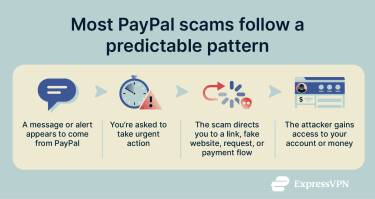
Understanding the mechanics behind these scams helps you recognize suspicious behavior and spot red flags before you fall victim.
Social engineering and phishing tactics
Social engineering is a technique in which scammers try to manipulate you into willingly handing over information. These scams often begin with phishing emails that mimic well-known services. In this case, the message is styled to look like PayPal, with familiar wording or alerts that encourage the user to click a link or provide account details.
The scammers often use:
- Emails pretending to be PayPal support or security alerts.
- Messages claiming your account is locked or needs verification.
- Fake invoices or unexpected payment receipts.
- Requests to “confirm,” “update,” or “verify” your details.
Psychological triggers
Scammers may also rely on psychology, using emotional triggers to push you into acting without thinking critically. Here are two common psychological tactics used in PayPal scams:
- Pressure to act immediately: Scammers often claim that something needs your immediate attention, telling you, for example, that “your account will be suspended in 24 hours.” The goal is to prevent you from double-checking the message.
- Curiosity or reward: Some scams promise refunds, bonuses, or payments you weren’t expecting. This taps into the desire to gain something.
Most common PayPal scams
Here are some common PayPal scams to watch out for.
Fake PayPal invoices and payment requests
Scammers sometimes send invoices and payment requests that appear professional and legitimate. These requests might claim to be for services, products, or cryptocurrency you supposedly ordered, subscriptions that need renewal, or debts you allegedly owe.
The biggest danger with this scam is that it often uses PayPal’s actual system, making it appear legitimate. Scammers might create fake business accounts and use PayPal’s actual invoicing feature for their scam. The invoices arrive in your real PayPal account, and notifications come from genuine PayPal email addresses, which lowers your defenses.
If you receive an invoice or payment request for services, products, or payments you did not authorize, ignore any links in the email and instead open PayPal manually in your browser or app to review it and report it from there.
Tech support and customer service scams
Tech support scams involve criminals posing as customer or technical support staff of a service you use, in this case, PayPal.
These scams often begin with phishing emails that include phone numbers for “customer service.” However, the provided phone number isn’t PayPal’s actual customer service number. When you call, believing you’re contacting PayPal, you’re instead reaching scammers who use various tactics to steal your money or gain access to your account.
The fake support representative might claim they need remote access to your computer to fix a security issue with your PayPal account or cancel a fraudulent transaction. Once they have remote access, they can install malware, steal financial and other sensitive information, or manipulate what you see on your screen to trick you into authorizing payments.
Another variation involves fake customer support calls where the scammer claims they need to verify your identity or cancel a fraudulent PayPal charge. They’ll ask you to provide authentication codes sent to your phone or email, which actually allow them access to your real PayPal account.
Overpayment scams
This scam targets sellers: the scammer pretends to be a legitimate buyer and sends you more money than required, often using a hijacked PayPal account or stolen card. They then claim the extra money was a mistake and ask you to wire the difference.
Once the real account holder notices the unauthorized transaction and files a dispute, PayPal removes the fraudulent payment. You lose both the difference you sent and, in many cases, the item you shipped.
Giveaways and contest scams
Giveaway and contest scams may claim you’ve won money, prizes, or special rewards from PayPal or through a PayPal-sponsored promotion. These scams typically arrive via email, social media messages, or text, providing instructions to claim your prize.
Some versions ask for a small payment to “cover shipping or administrative costs” for your prize, while others direct you to a phishing website where you’ll “confirm your account” to receive the money.
To avoid these scams, ignore unsolicited prize notifications, never pay fees to claim a reward, and check PayPal’s official website or app. Legitimate promotions will always be listed there, not in unexpected messages.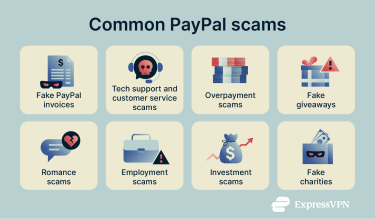
PayPal romance scams
These follow the classic pattern of online romance scams but use PayPal as a key tool. Scammers develop online relationships with victims through dating websites, social media, or messaging apps, building trust over weeks or months before they request financial help.
They often ask for funds via PayPal and may request you use the Friends and Family option. This method offers no buyer protection because it’s meant for trusted personal transfers, not purchases. Since PayPal treats these payments as voluntary gifts, you generally can’t open a dispute or request a refund, which makes recovering your money more difficult.
Employment scams targeting PayPal users
Scammers sometimes approach people with enticing job offers or business opportunities that seem legitimate. The goal is to trick unsuspecting individuals into sending money or merchandise on the scammer’s behalf, often using their PayPal accounts.
The scam usually works like this: the scammer convinces you to act as an intermediary for payments or shipments. They may instruct you to update your PayPal account with a different address or to send funds to a supplier. Once you complete the transaction, the scammer collects the goods or money, leaving you responsible for any complaints or losses from buyers or the supplier.
Victims often only realize they’ve been scammed after disputes arise, sometimes involving shipments or payments that never reached the intended recipients. In some cases, scammers exploit the fact that the PayPal account is in your name, making you liable for the transactions.
Investment scams involving PayPal
These scams use PayPal as a payment method for fraudulent investment opportunities. Scammers promote fake investment platforms, Ponzi schemes, or too-good-to-be-true returns on stocks, forex, real estate, or other assets.
These scams often begin with social media advertisements or unsolicited messages from supposed investment professionals showing screenshots of massive returns. They pressure you to invest quickly to take advantage of limited-time opportunities.
After you send money through PayPal, you might initially see fake returns in an online dashboard they control, encouraging you to invest more. Eventually, the scammer disappears, or the platform becomes inaccessible, and your entire “investment” is gone: there was no real account or asset behind it.
Charity scams using PayPal
Charity scams exploit people’s generosity by soliciting donations for fake charitable causes. These scams often intensify after natural disasters, during holiday seasons, or around high-profile tragedies, medical emergencies, or community projects. Scammers create websites, social media campaigns, or send emails claiming to represent legitimate charities, or in some cases, they create entirely fictional organizations.
The fake charity may have a name very similar to a real organization. They use emotional appeals and urgent language about people in need, directing you to donate immediately through PayPal. The money goes directly to the scammer rather than helping anyone in need.
Another trend involves scammers hijacking legitimate fundraising efforts. They create copycat campaigns using information and images from real fundraisers but direct donations to their own PayPal accounts instead of the legitimate recipient. To avoid this type of scam, research the charity thoroughly or consider donating through PayPal Cause Hub, where all the charities have been vetted by PayPal experts.
Signs you’re being scammed on PayPal
Scam PayPal messages and emails often contain small indicators that something is off:
- Generic greetings like “Dear Customer” or “Valued Member” instead of your actual name.
- Poor grammar, spelling errors, and awkward phrasing.
- Email addresses that don’t match PayPal’s domain.
- Links that don’t lead to PayPal’s official website (before clicking any link, hover your mouse over it to preview the destination URL).
- Unexpected attachments in suspicious emails claiming to be from PayPal.
- Messages that claim your account is restricted, suspended, or under review.
- Mismatched branding or low-quality images.
- Emails that ask for sensitive information, such as passwords, full banking or card details, and security codes.
When in doubt, avoid clicking links or replying to suspicious emails. Instead, open your browser, manually navigate to PayPal, log into your account, and check your messages or notifications. If PayPal genuinely sent you something important, it will appear in your account’s message center. If it doesn’t, it’s likely a scam.
How to protect yourself from PayPal scams
With a few safety habits and awareness of how PayPal communicates, you’re more likely to avoid the overwhelming majority of PayPal scams.
Best practices for safe transactions
- Only ever sign into PayPal through the website or official app (avoid email links).
- Double-check any unexpected payment requests or invoices. Don’t pay any suspicious ones before verifying them.
- Keep your device and browser updated, and install an antivirus with strong phishing protection.
- Use strong, unique passwords for your PayPal login (a password manager can help generate and store strong passwords).
- Turn on 2FA for added security.
- Review your account activity regularly for any suspicious activity.
- When making purchases, use PayPal’s Goods and Services option, which provides buyer protection, rather than the Friends and Family option.
- Avoid conducting PayPal transactions over public Wi-Fi networks without using a VPN to secure your connection. That said, VPN usage can sometimes lead to additional verification, especially if PayPal registers logins from unusual regions. If you encounter issues while logging into the PayPal app, switch to your mobile network rather than using public Wi-Fi without VPN protection.
What to do if you’ve been scammed
If you believe you’ve been scammed, you should act quickly to prevent further damage:
- Change your PayPal password immediately: If you use the same password elsewhere, change it there, too.
- Enable 2FA: This blocks scammers from logging in from an unrecognized location, even if they have your password.
- Review recent account activity: Look for payments, security messages, or login attempts you didn’t make.
- Remove unknown devices from your account: Open your account settings and sign out of any unfamiliar sessions.
- Scan your device with reputable antivirus software: This helps detect malware that might have captured your PayPal login details or redirected you to a spoofed page.
- Report the incident to PayPal: You should also file a report to your country’s official fraud and cybercrime reporting agency. In the U.S., this is the Federal Trade Commission (FTC).
- Watch for follow-up messages: Scammers sometimes try to contact victims again with additional claims, fake refunds, or more phishing attempts. Be cautious of any unexpected PayPal-related communications.
If you’ve been targeted and don’t feel comfortable keeping your account active anymore, you might also consider safely deleting your PayPal account.
Reporting a scam to PayPal
If you suspect a scam, report it immediately. PayPal has official channels to help protect your account and stop attackers:
- Forward phishing emails to phishing@paypal.com.
- Log into your account and report suspicious activity in the PayPal Resolution Center.
Reporting scams also helps PayPal identify new malicious activity and protect other users.
How to dispute unauthorized transactions
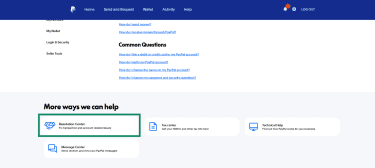
If someone tricked you into giving away your PayPal login credentials or stole them and then accessed your account to make payments, PayPal’s Resolution Center is your next step.
- Access PayPal’s Resolution Center by logging into your account and navigating to the help section.
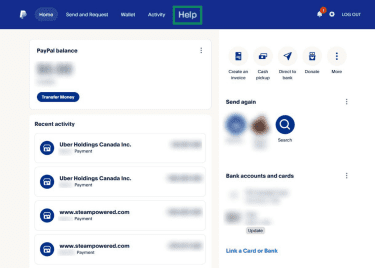
- Click Resolution Center.
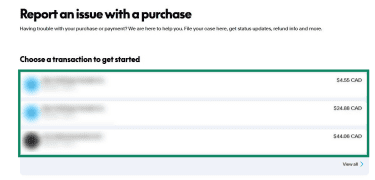
- Click the specific transaction from your activity list.
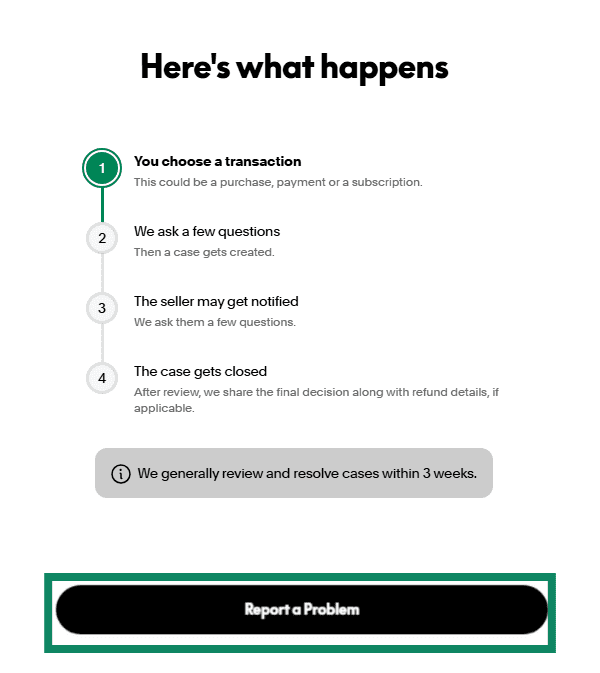
- Select Report a Problem and follow the on-screen prompts.
For transactions made with linked credit cards, you have an additional avenue for disputes: you can file a chargeback dispute directly with your credit card company. Credit card companies have their own scam and fraud protection policies, and they may rule in your favor even if PayPal didn’t. However, note that it’s against PayPal’s policy to pursue both at the same time or ask for a double recovery of your funds.
FAQ: Common questions about PayPal scams
Will PayPal refund me?
If you were tricked into authorizing the payment, PayPal generally will not refund it. Refunds for unauthorized transactions only apply when someone uses your account without your permission.
However, you may still be protected under PayPal Buyer Protection if the payment was for a purchase that never arrived or was significantly not as described. If PayPal denies your claim, you might also have recourse through your credit card issuer’s chargeback rights if the payment was made with a linked card.
How can I tell if a PayPal message is fake?
Look for warning signs such as generic greetings, unofficial email addresses, urgent or threatening language, links that don’t lead to PayPal, and requests for personal information. If you’re unsure, don’t click anything. Go to your official PayPal account (web or app) and check for alerts there instead. PayPal will never ask you to provide full passwords or full credit card numbers via email or ask you to send sensitive credentials this way.
What tools help prevent PayPal scams?
Tools like spam filters, secure password managers, and browser-based phishing protection can help detect suspicious messages or websites. Using a VPN on public Wi-Fi also protects your connection and prevents third parties from monitoring your traffic. These tools don’t replace caution, but they add an essential extra layer of protection.
What does PayPal do to protect users?
PayPal uses encryption and fraud monitoring and offers account protections such as two-factor authentication (2FA) and passkeys to prevent unauthorized access. It also has buyer and seller protection programs.
Is it safe to use PayPal while connected to a VPN?
Yes. In fact, using PayPal over a VPN can be safer than a regular connection, especially on public or shared Wi-Fi. A VPN encrypts your internet connection, protecting your login credentials and financial information from potential eavesdroppers on shared networks like coffee shop Wi-Fi or hotel internet. Just make sure you’re using a reputable VPN and connecting to secure networks.
Take the first step to protect yourself online. Try ExpressVPN risk-free.
Get ExpressVPN